My laptop usually has a 32 bit GNU / Linux install and a 64 bit install also.
It pays to remember which you are logged into when using openpfgw
-su: ./pfgw64: cannot execute binary file
The answer as to why you might get that response is simple, however it is easy to mistake the symptom.
Running off and websearching 'cannot execute binary file', was the wrong thing to do, and assuming that 'su' was somehow broken was a red herring.
Logging into a console as root and running ./pfgw64 gives a more meaningful:
-bash: ./pfgw64: cannot execute binary file
...which should be enough to tell you that the problem is not 'su', which in my case is just sitting in front of bash and relaying the message.
I hinted at the real cause earlier. Running ./pfgw32 will see a better result, because you are logged into a 32 bit system!
It is great that openpfgw provide optimised binaries for 32 bit and 64 bit, and it is up to you, as the user, to select the correct one!
Remember that openpfgw will also needs some libgmp libraries in order to run, otherwise expect a complaint about a missing .so file.
Sunday, June 26, 2011

Wednesday, April 20, 2011
making primes - fun with niece and nephew
You cannot make a prime by multiplying other numbers together
Whichever naive definition* you choose to give, some examples always help.
Once the students have an idea of what is and is not a prime, a fun exercise can be to pick a significant year (Man on the moon), and work some addition and subtraction.
Using just the individual digits of 1969, challenge the student to see, how many primes they can construct, using addition and subtraction.
This exercise is a reinforcing mechanism in that instead of focusing on multiplication, you are working a secondary construction method.
- 2 = 9 - 6 - 1
- 3 = 9 - 6
- 5 = 6 - 1
- 7 = 6 + 1
- 11 = 9 + 9 - 1 - 6
- 13 = 9 + 9 + 1 - 6
- 17 = 9 + 9 - 1
- 19 = 9 + 9 + 1
Doing this with a group of students, it is more likely that at least one will spot that a +1 in the construction, can be switched to -1 in the construction, and often obtain a new prime.
Obviously this is not a general rule, however it does introduce the student to the fact that sometimes when you have a prime, another can be found, just two away.
Now use another significant year, say 1989 (Fall of the Berlin Wall), and repeat the exercise.
( Not so easy with the 1989 example )
And use the year of birth for some of the students, see how many constructions can be made.
A useful follow up discussion can be to examine why 1969 is a better specimen than 1989, for this particular exercise.
How about 1979? Better? Worse?
*Note: I used the phrase naive definition at the beginning. With younger learners it is sometimes a useful exercise, to refine a definition, rather than give a rigorous definition at the outset.
If the student asks but what about 1, I can make 7 from 1*7, then you have an interaction, and have stimulated some thought.
Sunday, February 20, 2011
pari GP terminal colours - readable darkbg
After 3 years or more of using Pari/GP, the default highlighting (in terminal), bothered me enough, to read up how to change it.
Here is a comparison of the effects of the highlighting change:

The lines prefixed %7 and %8 and in between, show the output is now in grey, and input highlighting is now greenish.
The original "1, 6, 3, 4, 5, 2, 3" profile known as lightbg is reactivated briefly, so it can be compared again.
Making the change permanent on Debian by:
and changing which lines are commented out, results in the top of my

So now when I start up Pari/GP my highlighting is set okay from the outset:

Notes and further reading:
If you want a lighter alternative to emacs on your system, then zile is a lightweight alternative that supports basic editing. Alternatively your system default editor is probably already chosen and use that.
The pari/GP command ...
... can be used interactively if you do not wish to make the change permanent.
darkbg abbreviated to just 'd' should work.
default(colors,darkbg)Here is a comparison of the effects of the highlighting change:
The lines prefixed %7 and %8 and in between, show the output is now in grey, and input highlighting is now greenish.
The original "1, 6, 3, 4, 5, 2, 3" profile known as lightbg is reactivated briefly, so it can be compared again.
Making the change permanent on Debian by:
emacs /etc/gprcand changing which lines are commented out, results in the top of my
/etc/gprc file looking like this:So now when I start up Pari/GP my highlighting is set okay from the outset:
Notes and further reading:
- Pari/GP package in Debian [ packages.debian.org ]
- Pari/GP home page [ pari.math.u-bordeaux.fr ]
If you want a lighter alternative to emacs on your system, then zile is a lightweight alternative that supports basic editing. Alternatively your system default editor is probably already chosen and use that.
The pari/GP command ...
default(colors,d)... can be used interactively if you do not wish to make the change permanent.
darkbg abbreviated to just 'd' should work.
Friday, January 7, 2011
r-project / r-cran and install.packages()
My version of the excellent statistics and mathematics package from r-project.org, is now 2.11, having updated to Debian Squeeze.
I tend to install just the minimal r-project packages and then immediately add rgl for pretty plot3d.
But before rushing into install.packages("rgl"), perhaps I should check where exactly the install code will end up.

looks to me as if

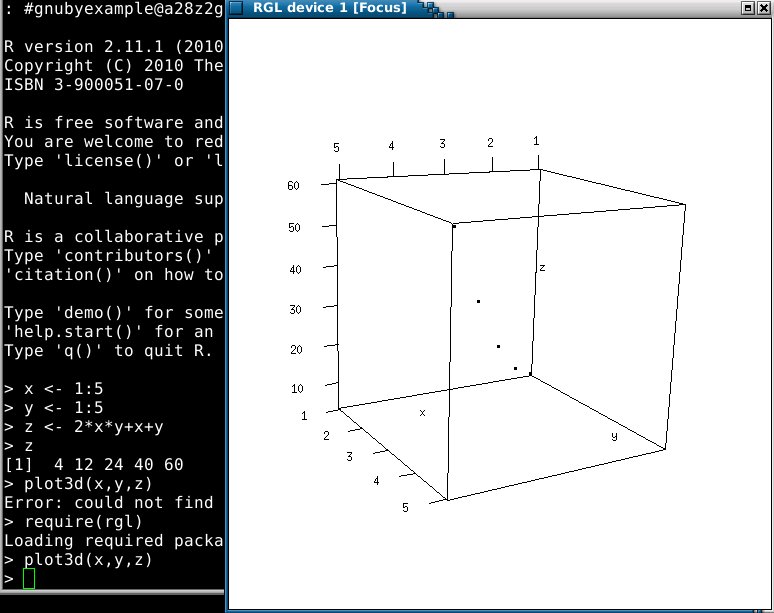
The plot3d() function in rgl allows you 'drag to spin' functionality so you can rotate, and examine the points from any angle you choose.
In the above I have dragged the back round to the front so zero is away from you, and hopefully, you can just make out the points curving up towards point (5,5,60) which is the end of the curve.
Some further illustrations of what rgl can do can be found on statmethods.net in section 'Spinning 3D Scatterplots'.
Further reading and links:

( The major work from Google Summer of code 2010 is probably in 2.12 released December 2010 )
I tend to install just the minimal r-project packages and then immediately add rgl for pretty plot3d.
But before rushing into install.packages("rgl"), perhaps I should check where exactly the install code will end up.
looks to me as if
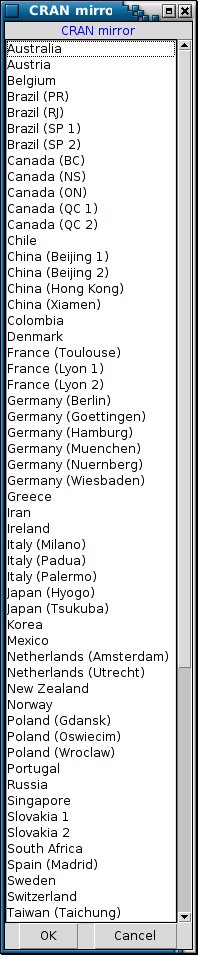
/usr/local/lib/R/site-library might be the destination (set in R_LIBS_SITE), so let us see...install.packages("rgl") pops up a country ordered list, for you to select a mirror for the install Interesting to see the number of mirrors, 5 for Germany, and 5 for Canada, and I should scroll down to below Taiwan to pick my country.
( Above confirms my guesswork that any install.packages on my system defaults to
/usr/local/lib/R/site-library ) Now what happens next, really changes the course of this article...so read on.
The install.packages() command failed as it could not locate GL/gl.h or GL/glu.h, and here I consulted my laptop.
The laptop already has rgl installed and working, so I used find and dpkg, and discovered my silly mistake.
There is already a debian package in squeeze named 'r-cran-rgl' which will do all the hard work for me :)
apt-get install r-cran-rgl
will replace the manual install.packages() method and get you into plot3d() in no time at all :)
( for those who are interested in where GL/glu.h lives, try libglu1-mesa-dev in support of manual install of rgl )
The plot3d() function in rgl allows you 'drag to spin' functionality so you can rotate, and examine the points from any angle you choose.
In the above I have dragged the back round to the front so zero is away from you, and hopefully, you can just make out the points curving up towards point (5,5,60) which is the end of the curve.
Some further illustrations of what rgl can do can be found on statmethods.net in section 'Spinning 3D Scatterplots'.
Further reading and links:
- rgl package [ r-project.org ]
- 3D plot of volcano [ r-project.org ]

Sunday, November 28, 2010
Gnumeric isprime() trial division
Gnumeric is one of several spreadsheet choices available to a Debian and / or GNU / Linux user.
How useful is Gnumeric to a mathematician? Quite.
It does include several functions that a more general package LibreOffice / OpenOffice Calc / Excel might not include.
Statistics and Number Theory are areas where Gnumeric currently outpaces the competition, in terms of available functions.
Here is one example, the isprime() function:
Do not be alarmed if you are not comfortable looking through the above code, it is simply there so that I may elaborate next.
The method here is trial division, which is a reasonable way of going about things for integers say of a billion or so. It is implemented in C and so is likely pretty fast at getting it's answer.
In fact a little bit of trial and error can show (very roughly) where the threshold for this isprime() function lies:
Firstly a candidate number (fairly large by spreadsheet standards):
factorial(18)+1=6402373705728001
which isprime() answers with #LIMIT!
Now those handy zeros at the end of the number will serve to reduce the number in size a little. Removing a zero from ...001 give ...01 and a new number: 640237370572801
...which Gnumeric isprime() is happy to process and return FALSE.
If you are wondering, then the new number ending ...2801 has a factor of 2801, how interesting, and completely accidental.
Anyway, I have provided a 15 digit number that isprime() will process, and demonstrated that it does have a limit to what it will attempt.
So no, you are not going to find huge primes by using entries in a Gnumeric spreadsheet, however it does provide very convenient environment, for exploring integer construction.
Should you use Gnumeric, to test out your hypothesis for prime number patterns?
Well why not, there is value in knowing that constructive forms hold true up to 15 digits certainly.
Later you will maybe explore a dedicated number theory program, there are several great open source offerings. However Gnumeric seems like a great place to just dive in.
Links and further reading:
How useful is Gnumeric to a mathematician? Quite.
It does include several functions that a more general package LibreOffice / OpenOffice Calc / Excel might not include.
Statistics and Number Theory are areas where Gnumeric currently outpaces the competition, in terms of available functions.
Here is one example, the isprime() function:
/*
 * Returns -1 (out of bounds), 0 (non-prime), or 1 (prime).
 */
static int
isprime (guint64 n)
{
      int i = 1;
      guint64 p = 2;

      if (n <= 1)
            return 0;

      for (i = 1; p * p <= n; i++) {
            if (ithprime (i, &p))
                  return -1;
            if (n % p == 0)
                  return 0;
      }

      return 1;
}
Do not be alarmed if you are not comfortable looking through the above code, it is simply there so that I may elaborate next.
The method here is trial division, which is a reasonable way of going about things for integers say of a billion or so. It is implemented in C and so is likely pretty fast at getting it's answer.
In fact a little bit of trial and error can show (very roughly) where the threshold for this isprime() function lies:
Firstly a candidate number (fairly large by spreadsheet standards):
factorial(18)+1=6402373705728001
which isprime() answers with #LIMIT!
Now those handy zeros at the end of the number will serve to reduce the number in size a little. Removing a zero from ...001 give ...01 and a new number: 640237370572801
...which Gnumeric isprime() is happy to process and return FALSE.
If you are wondering, then the new number ending ...2801 has a factor of 2801, how interesting, and completely accidental.
Anyway, I have provided a 15 digit number that isprime() will process, and demonstrated that it does have a limit to what it will attempt.
So no, you are not going to find huge primes by using entries in a Gnumeric spreadsheet, however it does provide very convenient environment, for exploring integer construction.
Should you use Gnumeric, to test out your hypothesis for prime number patterns?
Well why not, there is value in knowing that constructive forms hold true up to 15 digits certainly.
Later you will maybe explore a dedicated number theory program, there are several great open source offerings. However Gnumeric seems like a great place to just dive in.
Links and further reading:
- Trial Division in C [ rosettacode.org ] (for comparison)
- Trial Division in Python [ rosettacode.org ]
- isprime() documentation for Gnumeric (very brief)
- Gnumeric numtheory.c in Debian Squeeze [ git.gnome.org ]
- Gnumeric source tree (browsable) [ git.gnome.org ]
- Trial Division notes [ planetmath.org ]
- Trial Division notes [ primes.utm.edu ]
Tuesday, October 26, 2010
Problem solving - when really stuck try...
- A cup of tea/coffee
- Social chat with a colleague
- Walk in the *fresh air
- Visit a huge building with great architecture/decor
*Without realising it you might be really need the fresh air!
( If you work in a Science building and have your own small office, then sitting in there all day with the door closed, will reduce the air quality. )
Visiting the Science Museum in London, a local historic building, or a local Cathedral usually works for me also.
( The Cathedral is not my way of seeking 'something divine', but they are usually architecturally interesting and generally not full of hustle and bustle )
For some, a Distraction can also work, and there is a Psychological Science Article summary here giving some details.
The full 2008 research paper by Chen-Bo Zhong, Dijksterhuis, and Galinsky can be found at utoronto.ca here.
Another option, which sometimes works, is to pick a marginally related problem, and plan to come back to the original in a few days time.
Sunday, October 10, 2010
gmp library - including methods in your c code
.
The gnu Gmp library has many methods for dealing with huge integers.
( It does a lot more than that but I keep a narrow focus for this article )
Here are some links to the documentation for versions 5 and older version 4
When writing your own programs in C, that make use of gmp, you will use an include such as:
...and then perhaps if working with mpz Integers you might use some of the Integer functions of gmp.
Diving in and compiling with gcc, you might see 'undefined reference to ...' messages, until you have the gmp headers installed, and tell gcc about that.

Compiling against the gmp library is different than simply using the gmp library, and you may need an additional package installed.
On Debian and Ubuntu the source files and/or headers are kept in separate packages from the executables, so as not to bloat your system.
Install the source for gmp using the following command:
(*Older Debian 6 Squeeze package is named libgmp3-dev rather than libgmp-dev)
...which brings down the necessary files so that gcc can use them in it's compile.

I used aptitude rather than apt-get in the above but the result is the same.
Recap:
Note: I use GNU/Linux and give my instructions for Debian and similar systems. If you use a different platform, then I am unable to help with that and you should look elsewhere for instructions tailored to your chosen platform.
(optional) Integer functions of gmp:
What follows are some hints/personal notes, which serve as a useful reminder to me personally.
( Please consult the official manual, using the links in the first paragraph, as a definitive source of explanation. )
The gnu Gmp library has many methods for dealing with huge integers.
( It does a lot more than that but I keep a narrow focus for this article )
Here are some links to the documentation for versions 5 and older version 4
- Gmp version 5 [ gmplib.org ]
- Gmp version 4 [ gnu.org ]
When writing your own programs in C, that make use of gmp, you will use an include such as:
#include <gmp.h>
...and then perhaps if working with mpz Integers you might use some of the Integer functions of gmp.
Diving in and compiling with gcc, you might see 'undefined reference to ...' messages, until you have the gmp headers installed, and tell gcc about that.
Compiling against the gmp library is different than simply using the gmp library, and you may need an additional package installed.
On Debian and Ubuntu the source files and/or headers are kept in separate packages from the executables, so as not to bloat your system.
Install the source for gmp using the following command:
apt-get install libgmp-dev
(*Older Debian 6 Squeeze package is named libgmp3-dev rather than libgmp-dev)
...which brings down the necessary files so that gcc can use them in it's compile.
I used aptitude rather than apt-get in the above but the result is the same.
Recap:
- Use in your C program
#include <gmp.h> - Have the dev package installed on your system
- Use the -lgmp flag when you invoke gcc
- gcc arguments -lm and -lgmp should be the LAST argument
[ as shown in the first screenshot ]
Note: I use GNU/Linux and give my instructions for Debian and similar systems. If you use a different platform, then I am unable to help with that and you should look elsewhere for instructions tailored to your chosen platform.
(optional) Integer functions of gmp:
What follows are some hints/personal notes, which serve as a useful reminder to me personally.
( Please consult the official manual, using the links in the first paragraph, as a definitive source of explanation. )
/* mpz_sub_ui versus mpz_sub where ui indicates unsigned integer rather than mpz processing */

/* mpz_cdiv_q versus mpz_tdiv_q will ceiling rather than truncate when calculating quotient */

/* mpz_cmp_ui Compare op1 and op2. Return a positive value if op1 > op2, zero if op1 = op2, or a negative value if op1 < op2. */
.
Subscribe to:
Posts (Atom)