Showing posts with label parigp. Show all posts

Sunday, June 23, 2019

pari operation time - Miller Rabin

Setting 1 in the call to ispseudoprime() in Pari/GP will get you a strong pseudoprime test (Miller-Rabin)

Pseudoprime tests are more practical first attempts when dealing with huge inputs ( In this example the number has 632202 decimal digits )

How long did the operation take? ## shows 13 hours 58 minutes


Link and further reading:


Thursday, June 27, 2013

Power of negative number - pari gp

Do use parentheses () to wrap your negative where necessary.


Because exponentiation has priority over +/- you should wrap your -1 in parentheses (), or, if just squaring, use the sqr() function.

The priority of operators in Pari/GP is detailed in Section 2.4 of the User Guide and titled "2.4 GP Operators"

Sunday, January 20, 2013

number of digits function - sage - sagemath

If you work with Sage a lot, then these two points will help you remember how to get a digit count:
  • Sage uses Objects to represent mathematical constructs
  • Sage is written in Python
   two_to_ten=2^10
   a_to_power=11^two_to_ten
   len(str(a_to_power))

Answer: 1067

There are 1067 digits in the number formed when 11 is raised to 1024

Pari/GP and number of digits:


In Pari/GP the length() function can be used in a similar way to len() in Sage. In Pari try length(Str(11^1024))


You can still access Pari/GP directly through sage.

Try this in Sagemath:


   gp("length(Str(11^1024))")

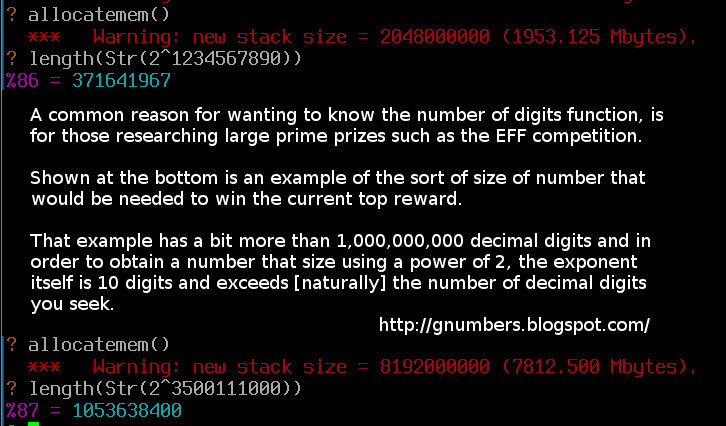
The very large - two examples using Pari:


( click on the image above for optimal font sizing )

Notes and further reading:

You can check the 11^1024 digit count yourself by following this wolfram alpha link:
    http://www.wolframalpha.com/input/?i=11%5E1024

Python note: Although sage allow you to use ^ to indicate raising to power, when writing in Python directly you should use the correct ** operator.
Pari/GP is designed particular for number theory, and does not have a real need to store mathematical constructs as api friendly Objects [by default] in the same way as Sage does.

Friday, September 23, 2011

log theory reminder - pari / gp useful

When working with a scientific calculator that has log to base e and log to base 10 only, employ 'Change of Base' theory.

Change of Base - Wikipedia


Source: http://www.wikipedia.org/wiki/Logarithm#Change_of_base


Change of Base - questions rewritten:

If you know even a little about logs then you should be able to answer the following question:

What is log to base 10 of 1000?
The blindingly obvious answer is three.

Here are two additional ways of phrasing things to get an answer:
  • To what power do we raise 10 so as to obtain 1000
  • How many zeros in 1000

Assuming your calculator only does natural log (log to base e) use Change of base:

log to base 10 of 1000 is (log to base e (1000))/(log to base e (10)) = 3


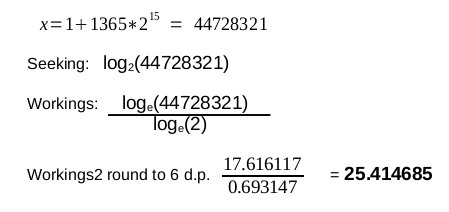
Pari / GP - an example using x=1+1365*2^15

Pari / GP is a number theory program. It is designed for working Mathematicians / Number theorists, and is most useful to folks comfortable with Mathematical theory.

It is not designed, primarily, as a 'user friendly calculator replacement' for lay folks.

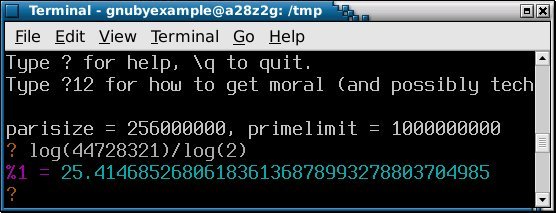
Now using x as given above - what is log to base 2 of x?

     Answer:


If you want that Answer as a continued fraction then Wolfram Alpha can do that.

Sunday, February 20, 2011

pari GP terminal colours - readable darkbg

After 3 years or more of using Pari/GP, the default highlighting (in terminal), bothered me enough, to read up how to change it.

default(colors,darkbg)

Here is a comparison of the effects of the highlighting change:


The lines prefixed %7 and %8 and in between, show the output is now in grey, and input highlighting is now greenish.

The original "1, 6, 3, 4, 5, 2, 3" profile known as lightbg is reactivated briefly, so it can be compared again.

Making the change permanent on Debian by:

emacs /etc/gprc

and changing which lines are commented out, results in the top of my /etc/gprc file looking like this:


So now when I start up Pari/GP my highlighting is set okay from the outset:


Notes and further reading:
On Ubuntu you will want to use the keyword sudo at the front of the command for editing /etc/gprc

If you want a lighter alternative to emacs on your system, then zile is a lightweight alternative that supports basic editing. Alternatively your system default editor is probably already chosen and use that.

The pari/GP command ...

default(colors,d)

... can be used interactively if you do not wish to make the change permanent.
darkbg abbreviated to just 'd' should work.

Tuesday, November 10, 2009

Mersenne Numbers - short sage example

I have used Sagemath and Pari/GP in the past and have found them both very capable Mathematics tools.

Pari/GP has been around a bit longer*, and has many recorded sample code snippets in The On-Line Encyclopaedia of Integer Sequences which AT&T kindly host.

(*Pari/GP has been GPL licensed for free use and modification for the last 15 years or more)

Sage is a bit different than a dedicated number theory program, and could perhaps be described in several ways:
  • A unifying front-end to many computerised algebra and mathematical programs
  • A means of accessing lots of computerised systems using a common language (python)
  • A front-end to Pari/GP (if you are doing Number Theory)
Anyway back to the maths...

See example output from below Sage script on sagemath cloud.

# Most Positive Integers of the form -1+2**n are Composite rather than Prime
#
# There is no significance to the range of numbers 7 through 37
# I selected that range so the primality test is_prime would not
# take too long.
#
# There are more than Mersenne Composites and Mersenne Primes generated by this
# loop. For example 8 gives -1+2**8 = 255 which is not a Mersenne Composite
# nor a Mersenne Prime.
#
# Expect many Falses and just a few Trues (Mersenne Primes) in the output.
#
for n in range(7,37):
mn=-1+2**n
print mn, is_prime(mn)
# True and False are intended to indicate if the number is Prime
# False indicates that the preceding number is a Composite

There is very little involved, and I could have written just the 3 lines and left it uncommented, however a few explanatory comments will hopefully illustrates things a bit better.

What inspired this example was some tabulation I did a while back; an extract is pasted below (click to enlarge):


If you have worked with Mersenne numbers before, then you will have spotted, I hope, that the example loop I used in sage is a bit too simple.

What makes a Mersenne number of any kind, is a prime power of two rather than just any old power of 2. So to be strictly useful, the sage example should only iterate through prime numbers for n, rather than all numbers in the range 7..37.

The great thing about an online version of sage is that anybody can register for an account and submit an example. Please feel free to alter the example I have given here to make it work better as just described, and try sage notebook yourself.
( Easy to take a copy of what I have done and paste it into your own notebook. )

Several universities already host sage online (convenient student access), although it is simple to install on any Ubuntu laptop if you want your own installation rather than relying on the Internet.

Downloads of Sage mathematics for other systems are available here.

Having read this article, and in particular my words on how to improve the example I gave, you might want to come up with your own enhancement to the opening line of Wikipedia's entry (2009 current):
In mathematics, a Mersenne number is a positive integer that is one less than a power of two

Finally a tip for any Pari/GP users who try Sage mathematics:
You may be using is_prime() rather than writing in pari isprime()
and here is quick extract to confirm what you are getting:
sage.rings.arith.is_prime(n, flag=0)
Returns True if prime, and False otherwise. The result is proven correct - this is NOT a pseudo-primality test!.