Showing posts with label sagemath. Show all posts

Tuesday, September 10, 2013

sagemath terminal colours - green > blue

Sagemath includes an embedded version of ipython and any changes you make to terminal colours need to happen in ipython_config.py in the correct place.

After doing a sage install there is a directory on my computer at location:
~/.sage/ipython-0.12/

The goal of this short set of hints is to assist you in creating a suitable profile_sage/ipython_config.py file.

That file should look like this:

# Configuration file for ipython.

c = get_config()

# Set the color scheme (NoColor, Linux, or LightBG).                                                                    
c.TerminalInteractiveShell.colors = 'Linux'

What that will achieve is to make your prompt green instead of blue.
The default (blue) seems a little bright on the eyes, so by setting colors = 'Linux' you get the less garish green prompt instead.

You can just run ahead and use geany or another editor to create ipython_config.py with content detailed above.

If you prefer to look at what iPython itself generates then you might wish to know of these two commands:
  • ipython profile list
  • ipython profile create justcreatedbyme
However be aware that you want to be running the embedded ipython version when doing 'profile create' in order to be sure a a fully compatible profile is created.
( Manual copy / rename things to get file to proper location of
profile_sage/ipython_config.py )

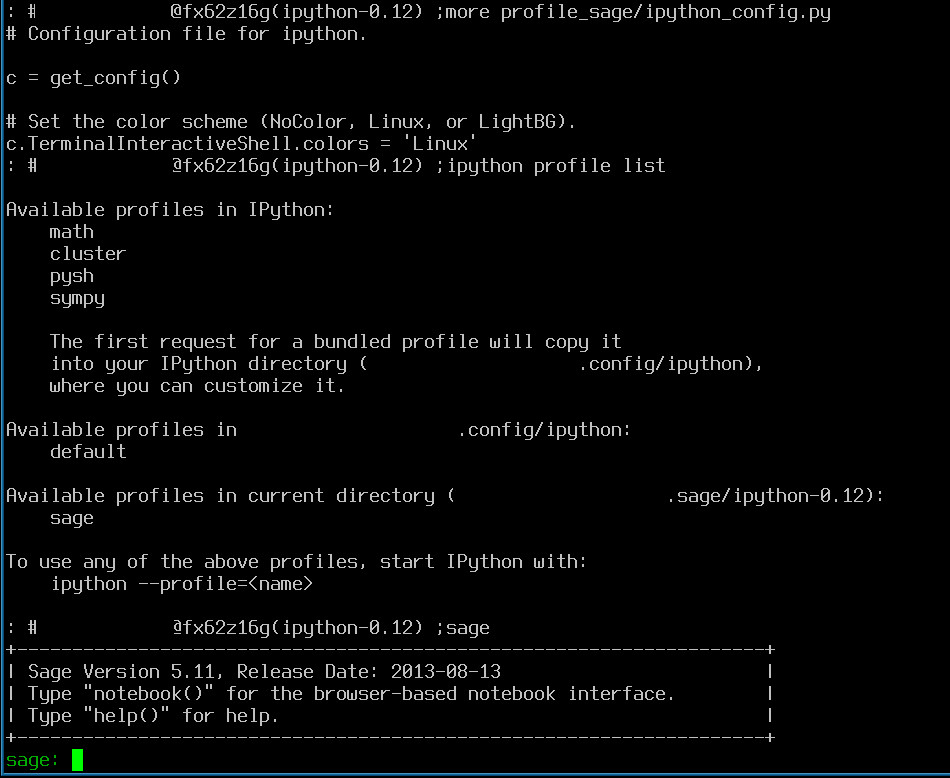
An example of the output from profile list is shown below:

List of profiles available to iPython

Sunday, January 20, 2013

number of digits function - sage - sagemath

If you work with Sage a lot, then these two points will help you remember how to get a digit count:
  • Sage uses Objects to represent mathematical constructs
  • Sage is written in Python
   two_to_ten=2^10
   a_to_power=11^two_to_ten
   len(str(a_to_power))

Answer: 1067

There are 1067 digits in the number formed when 11 is raised to 1024

Pari/GP and number of digits:


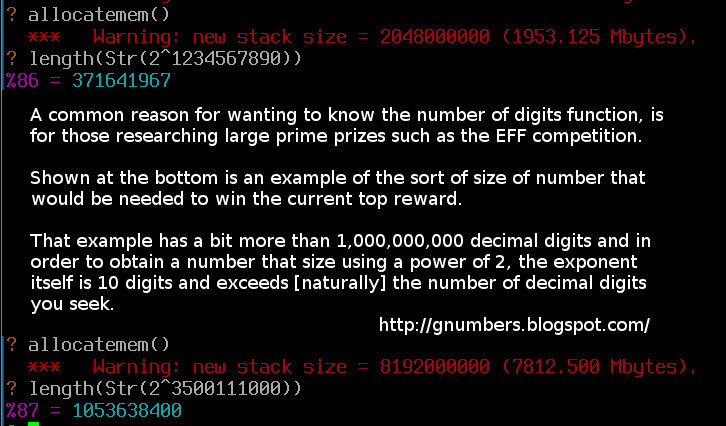
In Pari/GP the length() function can be used in a similar way to len() in Sage. In Pari try length(Str(11^1024))


You can still access Pari/GP directly through sage.

Try this in Sagemath:


   gp("length(Str(11^1024))")

The very large - two examples using Pari:


( click on the image above for optimal font sizing )

Notes and further reading:

You can check the 11^1024 digit count yourself by following this wolfram alpha link:
    http://www.wolframalpha.com/input/?i=11%5E1024

Python note: Although sage allow you to use ^ to indicate raising to power, when writing in Python directly you should use the correct ** operator.
Pari/GP is designed particular for number theory, and does not have a real need to store mathematical constructs as api friendly Objects [by default] in the same way as Sage does.

Wednesday, September 15, 2010

sage 'open source mathematics' - some compilation experience

sage (or sagemath) is a unifying front-end to many computerised algebra and mathematical programs.
Previously I have used sage on Ubuntu Karmic and loved it.

Just now there is no official Debian or Ubuntu package for sage, and so installing it on my new system (Debian Squeeze) gave me a choice:
  1. Install the prebuilt binary package that sage themselves provide
  2. Download the source and issue 'make' on my own machine.
There is little advantage to building from source (option 2), unless you will be running mathematical procedures that run over several nights.

In particular if you are new to sage then the prebuilt binary packages are the 'no hassle' way of getting up and running.

If you just want to see what sage is about, then the live cd, is an excellent way to try things out (no change to your system at all)


Compiling and having sage 'self check':

Summary: make test

Note: I work on GNU/Linux and so my instructions are particular to that platform. Seek out the install guides at sagemath.org if you want help with another platform.

Download the latest .tar file from a mirror listed here.
( My .tar was around 300MB and I checked its md5sum matched against the site )

Untar into /usr/local/ or /opt/local/ or your home directory, as you prefer
( I will use /opt/local for this article )

Have a quick look at the readme file at /opt/local/sage-4.5.3/README.txt

Follow the install guide at sagemath.org in conjunction with this article.

I mentioned about getting sage to 'self check', and what I meant by that, was running the inbuilt mathematical tests that come with sage.

Glancing at README.txt you might be thinking of setting SAGE_CHECK="yes", however this is a different 'self check'*

( *Sage is made up of a number of .spkg files and SAGE_CHECK="yes" will initiate integrity checks on those .spkg files and checks for compatibility with your system )

Running make test initiates a two stage process:
  1. The build
  2. mathematical test suite
The test suite (step 2) took a couple of hours on a 2.8 ghz machine running Debian Squeeze 64 bit.


When you are all done then you might want to issue the following command:
chown -R someuser:root /opt/local/sage-4.5.3/

( replace someuser with the the username you normally log in with )

*** End of main article. ***
( The next section is for those interested in lower level details of sagemath source and .spkg testing in particular )

Bundling python within an application and compatibility:

Sage does not use Python that already existed on your system, and instead, bundles Python 2.6.4 to support all sage applications.

This is a perfectly valid approach* but does freeze in time, that bundled Python, against a moving target (your system and upgrades)

( *as a Debian user I would really like a version of sage that integrates more fully with optimised libraries debian itself took the trouble to install. This is not currently the case and I understand some of the why and why not involved. )

In particular Python 2.6.4 bundled in sage 4.5.3 is probably missing a patch to the file test_zlib.py

Unpatched (as supplied by sagemath.org) my output using SAGE_CHECK="yes" was:
test test_zlib failed -- Traceback (most recent call last):
  File "/opt/local/sage-4.5.3/spkg/build/python-2.6.4.p9/src/Lib/test/test_zlib.py", line 84, in test_baddecompressobj
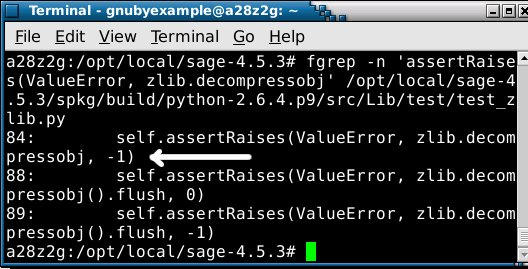
    self.assertRaises(ValueError, zlib.decompressobj, 0)
AssertionError: ValueError not raised

322 tests OK.
3 tests failed:
    test_distutils test_httpservers test_zlib

...but then applying the patch with a manual edit to the file test_zlib.py


...sees test_zlib outcome being different as shown:

test_zlib
323 tests OK.
2 tests failed:
    test_distutils test_httpservers

When the next version of sage (4.6) is officially released, hopefully it will include Python 2.6.5 or newer, so as to have that patch already applied.

Links and reference:
Tuesday, November 10, 2009

Mersenne Numbers - short sage example

I have used Sagemath and Pari/GP in the past and have found them both very capable Mathematics tools.

Pari/GP has been around a bit longer*, and has many recorded sample code snippets in The On-Line Encyclopaedia of Integer Sequences which AT&T kindly host.

(*Pari/GP has been GPL licensed for free use and modification for the last 15 years or more)

Sage is a bit different than a dedicated number theory program, and could perhaps be described in several ways:
  • A unifying front-end to many computerised algebra and mathematical programs
  • A means of accessing lots of computerised systems using a common language (python)
  • A front-end to Pari/GP (if you are doing Number Theory)
Anyway back to the maths...

See example output from below Sage script on sagemath cloud.

# Most Positive Integers of the form -1+2**n are Composite rather than Prime
#
# There is no significance to the range of numbers 7 through 37
# I selected that range so the primality test is_prime would not
# take too long.
#
# There are more than Mersenne Composites and Mersenne Primes generated by this
# loop. For example 8 gives -1+2**8 = 255 which is not a Mersenne Composite
# nor a Mersenne Prime.
#
# Expect many Falses and just a few Trues (Mersenne Primes) in the output.
#
for n in range(7,37):
mn=-1+2**n
print mn, is_prime(mn)
# True and False are intended to indicate if the number is Prime
# False indicates that the preceding number is a Composite

There is very little involved, and I could have written just the 3 lines and left it uncommented, however a few explanatory comments will hopefully illustrates things a bit better.

What inspired this example was some tabulation I did a while back; an extract is pasted below (click to enlarge):


If you have worked with Mersenne numbers before, then you will have spotted, I hope, that the example loop I used in sage is a bit too simple.

What makes a Mersenne number of any kind, is a prime power of two rather than just any old power of 2. So to be strictly useful, the sage example should only iterate through prime numbers for n, rather than all numbers in the range 7..37.

The great thing about an online version of sage is that anybody can register for an account and submit an example. Please feel free to alter the example I have given here to make it work better as just described, and try sage notebook yourself.
( Easy to take a copy of what I have done and paste it into your own notebook. )

Several universities already host sage online (convenient student access), although it is simple to install on any Ubuntu laptop if you want your own installation rather than relying on the Internet.

Downloads of Sage mathematics for other systems are available here.

Having read this article, and in particular my words on how to improve the example I gave, you might want to come up with your own enhancement to the opening line of Wikipedia's entry (2009 current):
In mathematics, a Mersenne number is a positive integer that is one less than a power of two

Finally a tip for any Pari/GP users who try Sage mathematics:
You may be using is_prime() rather than writing in pari isprime()
and here is quick extract to confirm what you are getting:
sage.rings.arith.is_prime(n, flag=0)
Returns True if prime, and False otherwise. The result is proven correct - this is NOT a pseudo-primality test!.