Friday, September 23, 2011

log theory reminder - pari / gp useful

When working with a scientific calculator that has log to base e and log to base 10 only, employ 'Change of Base' theory.

Change of Base - Wikipedia


Source: http://www.wikipedia.org/wiki/Logarithm#Change_of_base


Change of Base - questions rewritten:

If you know even a little about logs then you should be able to answer the following question:

What is log to base 10 of 1000?
The blindingly obvious answer is three.

Here are two additional ways of phrasing things to get an answer:
  • To what power do we raise 10 so as to obtain 1000
  • How many zeros in 1000

Assuming your calculator only does natural log (log to base e) use Change of base:

log to base 10 of 1000 is (log to base e (1000))/(log to base e (10)) = 3


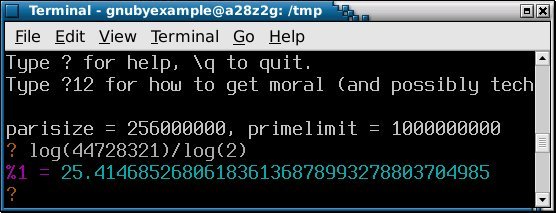
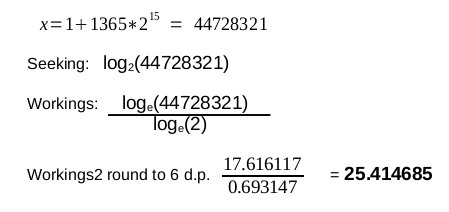
Pari / GP - an example using x=1+1365*2^15

Pari / GP is a number theory program. It is designed for working Mathematicians / Number theorists, and is most useful to folks comfortable with Mathematical theory.

It is not designed, primarily, as a 'user friendly calculator replacement' for lay folks.

Now using x as given above - what is log to base 2 of x?

     Answer:


If you want that Answer as a continued fraction then Wolfram Alpha can do that.

Wednesday, September 21, 2011

Introduce a little Geometry into your life - morning

What is not to like about Geometry ... it surrounds us, so why not embrace it?

Patios & Pools to Steps & Walkways and beyond.

Have fun and introduce a bit of Geometry into your day!

Wednesday, August 31, 2011

Counter examples as Mnemonics - Remainders

When refreshing my memory about a Mathematical subject - I find counter examples can be a useful way of getting active. Here is an example about mod() / Congruences.

Working mod 4 with two numbers a=5 and b=7

...and writing in computing function form we say...

mod(a,4) = 1

  and

mod(b,4) = 3

Now apply a scaling (k) to both numbers ... say ... scaling by 11

mod(ka,4) = 3                       (ka is 55)

  and

mod(kb,4) = 1                       (kb is 77)


And what we observe is that the results seem to have exchanged places :)

This counter example is a good reminder that applying the same scaling to two different numbers does not always preserve the mod result.

There is much theory to access regarding congruences / modulo, and counter examples like this, can be a good way of stimulating a refresher of that theory.

Sunday, August 21, 2011

The death of week numbers - and browser help

Used to be a time when workers in offices had week numbers marked at the bottom of the page, of a desktop paper diary.

Managers and others with budget responsibilities found these particularly useful

Now folks are using smartphone calendars, Google calendars, or Lightning to help with their planning.


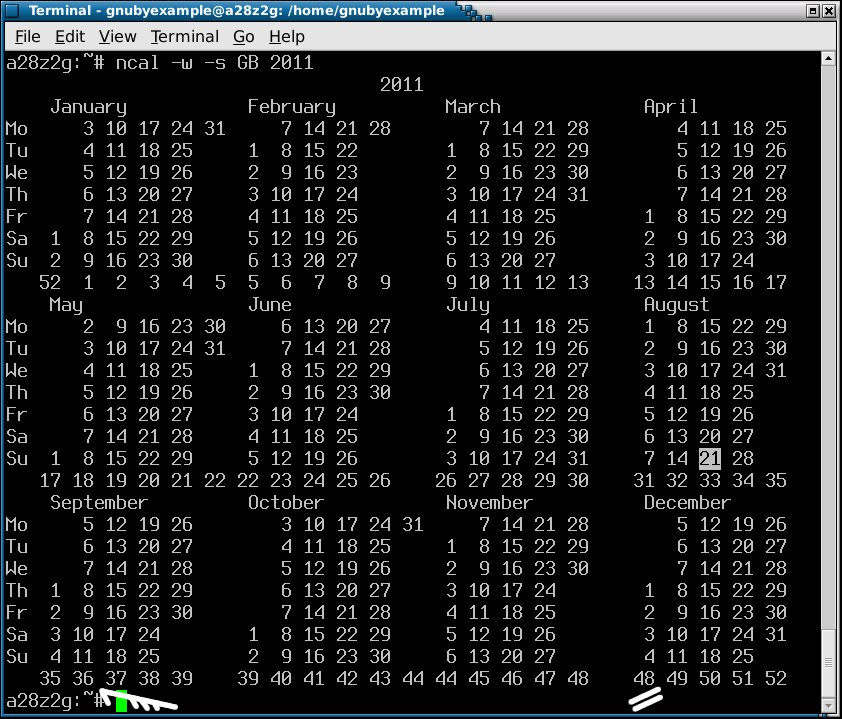
Marathon preparation - 12 weeks or so right?

Question: When do I need to start my running preparation if my Marathon is 1st December?

The simple answer is 48-12 = week commencing 5th September .... but some images make it clearer.


...and for folks who live in a web browser rather than at the command line ...


Wednesday, August 17, 2011

gmp mpz gotchas - part 1

The GNU mp (gmp) library is a fast and stable library for working with large integers.

As with all software, when you begin using it, you find out things that you should and shouldn't do.


NULL arguments to functions - check for each function:

mpz_get_str() is a function which seems to handle a NULL first argument just fine.

Example function call:

outM = mpz_get_str(NULL,10,M);

(outM above is a char pointer and gets the decimal representation of mpz M)

In the documentation, the function signature for mpz_get_str() is given as:

char * mpz_get_str (char *str, int base, mpz_t op )

Second example - be careful what you assume!

if (mpz_mod_ui(NULL,C,6) == 0) { /* do something */ }

The above throws a runtime error - not surprising when you consult the documentation for the function signature.

unsigned long int mpz_mod_ui (mpz_t r, mpz_t n, unsigned long int d ) 

mpz_mod_ui() is quite clear that the first argument should be an mpz type, so don't disappoint it :)

When working with gmp, you are effectively working in two type spaces - C and native gmp types. Functions such as mpz_mod_ui() are really flexible, in that they give you the mod() result in two different type spaces.

Libraries are not mind readers, and cannot know in which type space your next line of code will be working. By giving you the result as both an unsigned long int and the mpz_t labeled here as r, the function is doing it's damnedest to help you out!

The downside is that you may well see little point in retaining the result in the other type space.

My runtime error was caused by me attempting to throw away the mpz_t result as it felt redundant.

Here is my new preferred way - use an mpz_t you set up particularly for transient results.

if (mpz_mod_ui(MOD_NULL,C,6) == 0) {
 /* flag as six multiple */
}

Just create your own mpz_t MOD_NULL and use it where you are not interested in keeping the result. You will need to run mpz_init(MOD_NULL) before executing the if statement illustrated.


Transient variables - bad coding practices to avoid:

In the past, I have been tempted to reuse spare variables - example:
    if (mpz_mod_ui(BSQR,C,6) == 0) {

It is bad coding practice to use a seemingly proper variable, as a holder for transient data / as a dump.

Using dump variables generally is not without issue, however naming the thing correctly is at least a step in the right direction :)


The important thing to remember is that whatever you call your transient variable, that it is not used to hold values that really are used in your logic.

Avoid the temptation to reuse a label wherever possible - it rarely leads to good things.


NULL as the first argument to mpz_get_str - probably going wrong here:

Earlier I used mpz_get_str() as an example of a function that worked with NULL as a first argument.

outBSQRM4AC = mpz_get_str(NULL,10,BSQRM4AC);

Knowing the function signature, and looking at the above line of code, you should be thinking char pointer for outBSQRM4AC.

Assigning the result of mpz_get_str() using an equals symbol is okay, and you are asking the gmp library to do your allocation for you.

If however, you known the maximum size of the MPZ / character array that you require, then you may prefer to predefine your character array, and tell mpz_get_str() to use it. In that case the the first argument of mpz_get_str() will not be NULL.

If you have predefined your character array (including size, then you might instead be using a call of this form:

mpz_get_str(outBSQRM4AC,10,BSQRM4AC);


Notes and Further Reading:

The publisher SAMS have a book "Teach yourself C in 24 hours"

In the Chapter "Hour 17 - Allocating Memory" there is a discussion about malloc() and free() and how to use them in conjunction with character pointers.


A more indepth volume is titled "Teach yourself C in 21 days", but it really depends on how far you want to take your C skills, as to which is the better option.


Neither of these books are particularly 'new', however that is one of the plus points of C, it has a stable api and a body of literature that never goes out of date.

Neither of these books will teach you C++, however I have not and probably never will have, any interest in learning C++

If you do, then the 'in 24 hours', probably does not come near to describing, the time that you will have to devote to becoming skilled in C++.

Better C++ literature is available, if you decide ANSI C is not where you wish to spend your time.

Saturday, August 13, 2011

Cython - notes and gotchas - part 1

Experimenting with Cython, as bringing together many variants of the same .c file, has me yearning to find a better Python / C balance.

Working through tutorials and experiments, I will note anything tricky, or any easy to fall into traps.


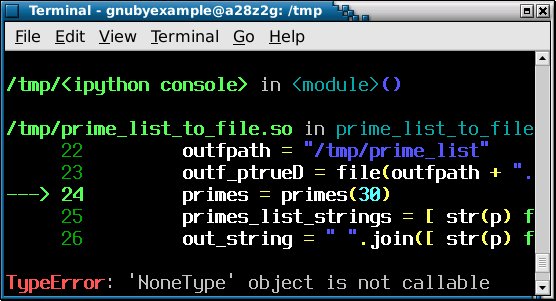
TypeError: 'NoneType' object is not callable:

Because Python is flexible, and does not insist on you declaring variables ahead of time, you may be tempted to do the same in Cython.


Better to declare the variable 'primes' explicitly, or to avoid name clashes.


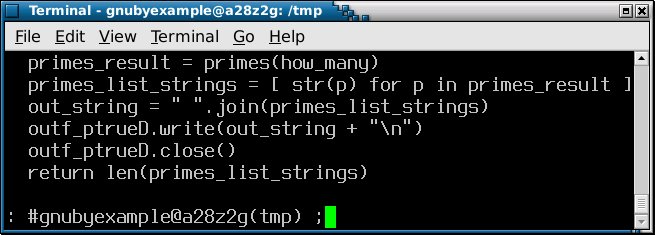
So in the second example the result of the function call ends up in 'primes_list_strings' and we work on it from there.

To clarify the original error: Calling the variable that holds the result 'primes', and making a function call to primes() in the same line, might lead to confusion.


Notes and Further Reading:

If you want completion features when working with Python, then one solution is to invoke iPython and use that.

There are several full IDEs for Python including Idle and Eric, but if you just need a little completion (and syntax highlighting), then iPython is okay also.


Screenshot of Eric from screenshots.debian.net:


Sunday, June 26, 2011

how many bits - are you 32 bit or 64 bit

My laptop usually has a 32 bit GNU / Linux install and a 64 bit install also.

It pays to remember which you are logged into when using openpfgw

-su: ./pfgw64: cannot execute binary file

The answer as to why you might get that response is simple, however it is easy to mistake the symptom.

Running off and websearching 'cannot execute binary file', was the wrong thing to do, and assuming that 'su' was somehow broken was a red herring.

Logging into a console as root and running ./pfgw64 gives a more meaningful:

-bash: ./pfgw64: cannot execute binary file

...which should be enough to tell you that the problem is not 'su', which in my case is just sitting in front of bash and relaying the message.

I hinted at the real cause earlier. Running ./pfgw32 will see a better result, because you are logged into a 32 bit system!

It is great that openpfgw provide optimised binaries for 32 bit and 64 bit, and it is up to you, as the user, to select the correct one!

Remember that openpfgw will also needs some libgmp libraries in order to run, otherwise expect a complaint about a missing .so file.